%20--%3e%3cdefs%3e%3cstyle%3e%20.st0%20{%20fill:%20%23061b40;%20}%20.st1%20{%20fill:%20%23306af1;%20}%20.st2%20{%20fill:%20%235ce5cf;%20}%20%3c/style%3e%3c/defs%3e%3cg%3e%3cpath%20class='st0'%20d='M55,10.5h9v3h-9v9h12V7.5h-12v3ZM64,19.5h-6v-3h6v3Z'/%3e%3cpolygon%20class='st0'%20points='69%2016.5%2078%2016.5%2078%2019.5%2069%2019.5%2069%2022.5%2081%2022.5%2081%2013.5%2072%2013.5%2072%2010.5%2081%2010.5%2081%207.5%2069%207.5%2069%2016.5'/%3e%3cpolygon%20class='st0'%20points='95%2010.5%2095%207.5%2083%207.5%2083%2022.5%2095%2022.5%2095%2019.5%2086%2019.5%2086%2016.5%2095%2016.5%2095%2013.5%2086%2013.5%2086%2010.5%2095%2010.5'/%3e%3cpath%20class='st0'%20d='M40,1.5v21h11.6l1.4-1.4v-7.6h0c0,0-1.4-1.5-1.4-1.5l1.4-1.4V2.9l-1.4-1.4h-11.6ZM50,19.5h-7v-6h7v6ZM50,10.5h-7v-6h7v6Z'/%3e%3c/g%3e%3cpath%20class='st1'%20d='M23.1,24L14.7,4.8l-4.9,11.2h3.8l-1.8,4H3.3L12.1,0H2C.9,0,0,.9,0,2v20c0,1.1.9,2,2,2h21.1Z'/%3e%3cpath%20class='st2'%20d='M34,0h-16.8l10.6,24h6.2c1.1,0,2-.9,2-2V2C36,.9,35.1,0,34,0ZM32.5,20h-4V4h4v16Z'/%3e%3c/svg%3e)
 Join Now
Recently, Google officially launched the Nano Banana image editing feature, which has received positive feedback in its Gemini app. Google has introduced this powerful image editing and generation feature into AI mode and Google Lens, making it more convenient for users to use.
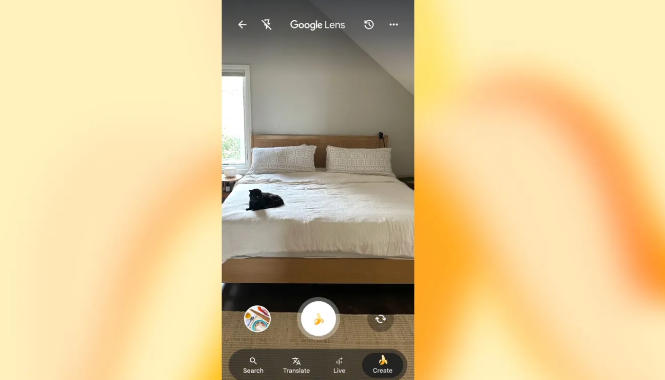
According to the latest information, the Nano Banana feature was officially launched on October 13th and is now available to Android and iOS users in the United States and India, with plans to expand to more countries and languages in the future. Notably, on Android devices, users can directly enter AI mode through the "Circle to Search" feature, greatly facilitating user experience.

In AI mode, users will see a new "+" icon at the bottom left of the prompt box, with voice input and Lens functions moved to the right. At the same time, AI mode has adjusted the page, removing the previous suggested carousel and replacing it with a simpler list of prompts. Users can access the photo album, camera, and use a banana emoji to create images. If they choose to generate an image, the prompt changes to "Describe your image," allowing users to either create a new image or edit an existing one.
The generated images will have a Gemini watermark, and users can download or share them directly. The integration of the Nano Banana feature in Google Lens is even more significant. After adding the "Live" search feature, Lens now includes a "Create" tab, allowing users to capture images directly using the front camera and quickly switch lenses. After taking a photo, the captured image will be added to the prompt box in AI mode, where users can input new prompts for further editing.
Currently, Nano Banana has been seen on Android devices in the United States within Google Lens and AI mode, and users need to select to join the AI mode search lab. In addition, Google has added 35 new languages and over 40 countries and regions to AI mode, bringing the total number of supported countries and regions to 200.
Key Points:
🌟 The Nano Banana feature is officially launched, enhancing the image editing and creation experience.
📱 Integration of AI mode and Google Lens allows users to easily capture and edit images.
🌍 New language and country support make the coverage of AI mode broader.